
⚡ the loop is over
steal my graph engineering prompt

Read time: 5 minutes | Unlock my Claude Skills Bundle
Hey friend, Alex here.
AI Twitter has a new favorite drawing: boxes and arrows. The pitch is that running agents in a loop is over, and serious builders now wire them up as graphs instead. I published a full technical breakdown on X, and the honest summary is that it’s real engineering with real costs: Python, databases, a framework called LangGraph.
Which leaves most of you outside. If you don’t write code, the loudest idea in AI right now looks like it has nothing for you. It does: the useful core is 3 habits, all 3 fit in a chat window, and we put them through a real test.
Today:
The Chat Graph: one paste-able prompt that runs any messy task with graph engineering’s discipline (any model, zero setup)
The honest A/B: one real task run twice, raw vs graph, with real message counts and one result I didn’t expect
4 free resources, including LangGraph itself and the official course that teaches it
WHAT IS GRAPH ENGINEERING?
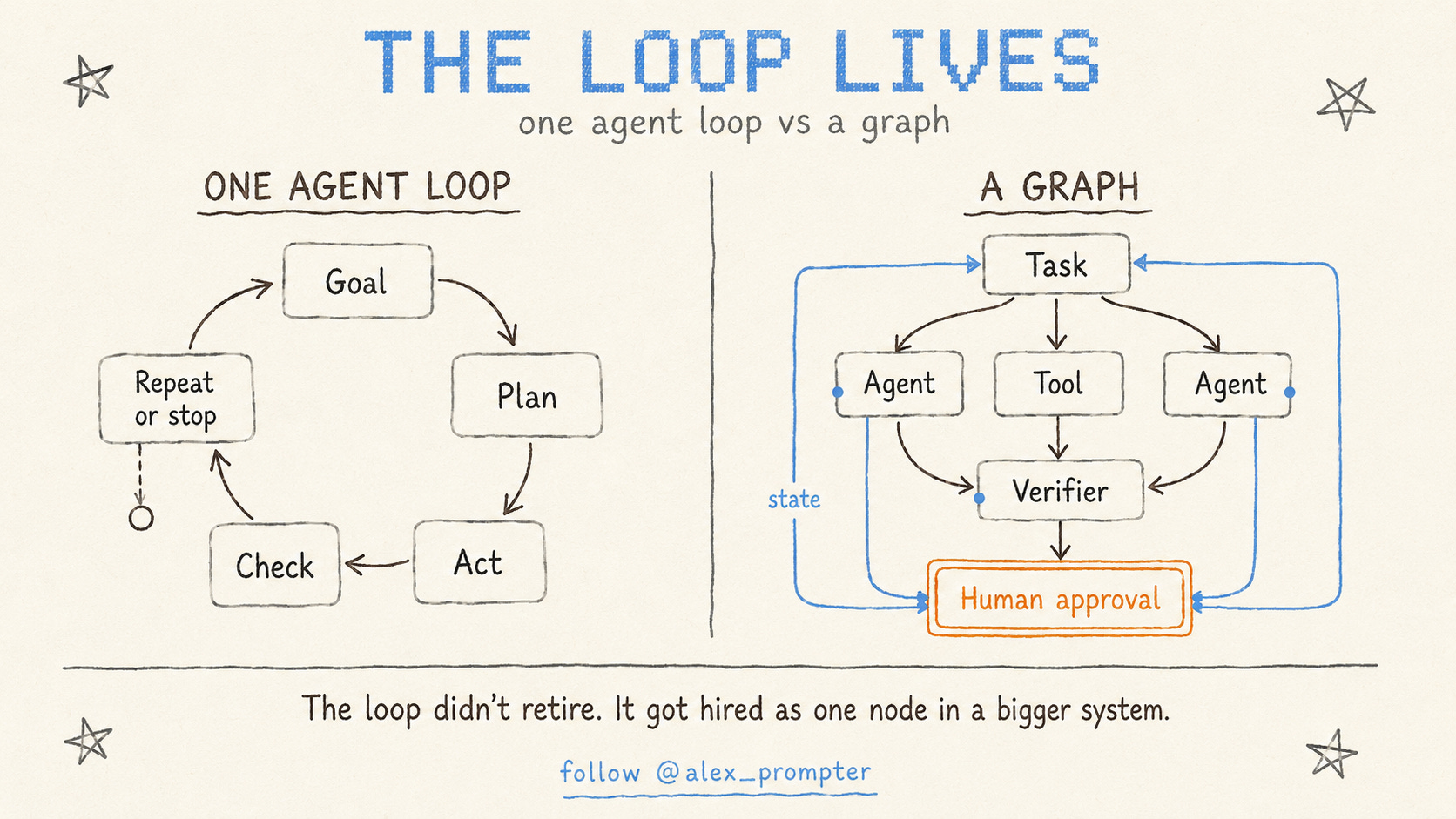
Two definitions before the superpower.
Loop = one worker who does everything. You give one AI a job. It reads, tries, checks its work, tries again, and keeps cycling until it decides it’s done. One agent, one goal, a verifier, and a stop condition. That’s it. That’s how you use Claude or ChatGPT right now.
Graph = several of those workers wired together.
A graph coordinates several loops, deciding what runs at the same time, what information passes between them, who can reject a result, and when the whole thing stops.
So a graph is not a replacement for a loop. Every node in a graph is a loop. A graph is the org chart. A loop is one employee.
Which means you don’t graduate from loops. You hire more of them. And a graph built on bad loops fails in more places at once, so the work still starts where it always started: one job, one worker, one clear signal for when to stop. Get that right and wiring the second worker in is easy peasy.
Skip it and you’ve built an org chart full of people who don’t know when they’re finished.
⚡ THE SUPERPOWER: The Graph Chat
You’ve had this chat before. You paste a big messy task into an AI, it asks one or two polite questions, then charges ahead, sounding thorough the whole way. Ten messages in, you find the crack: an assumption you never approved, buried three responses back, with real work built on top of it. Now the job is demolition first, then the task.
The graph crowd solved this with code and databases. Strip that away and the insight underneath is simple: an AI that has to name its steps, keep the key facts on screen, and stop at every gap can’t build on a hidden guess. A graph doesn’t make the model smarter. It makes the guessing visible while the guess is still cheap.
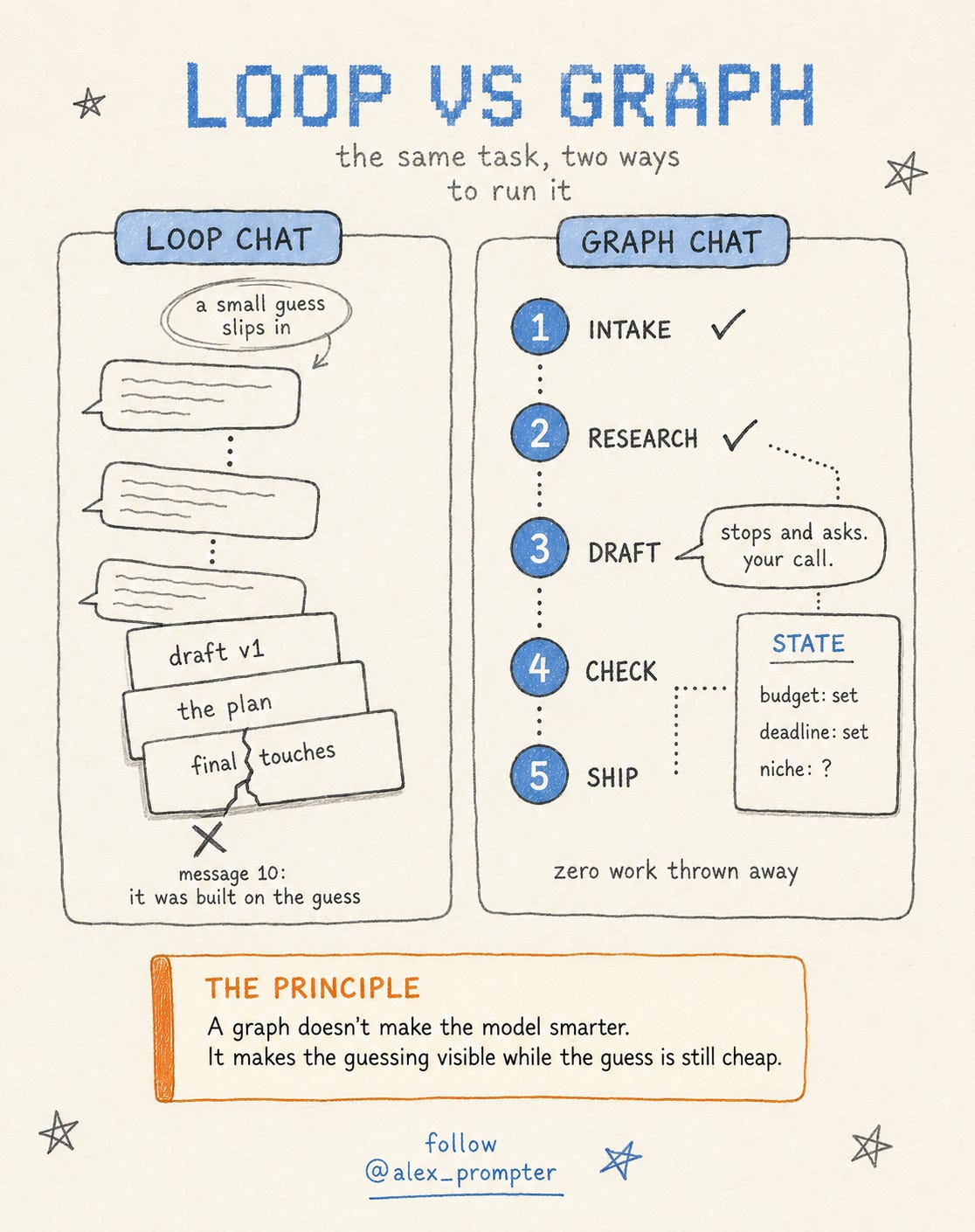
We ran the honest test on a real job. The raw chat invented an entire 3-project plan from its own assumptions, and all of it went in the bin. The graph run started from the same weak brief and produced zero work we had to throw away.
⚙️ THE WORKFLOW
So I compressed the 3 habits into one prompt. It makes the model set up its stations (the nodes), keep the ticket on screen (a STATE block), stop and ask when information is missing, and quit a step after 2 failed tries. Open a chat with any model and paste this:
You are running this task as a graph, not a loop.

Before doing anything, break my task into named NODES. Each node does
exactly one job (research, draft, check, decide). Then define a STATE
block: the 3-6 pieces of information that matter for this task, with a
starting value for each (write "unknown" where needed).

Rules for the run:
1. Execute ONE node per response. Start each response with the node name.
2. End every response with the updated STATE block and one line:
   "Next node: [name], because [reason]."
3. If a node needs a decision or information only I can give, stop and
   ask. Never guess and continue.
4. If a node produces a weak result, retry it once with a different
   approach. If it fails twice, mark it in STATE and move on. Never
   retry more than twice.
5. The run ends when every STATE field is filled and I confirm, or
   after 8 nodes, whichever comes first. Say clearly when we're done.

My task: [describe your messy multi-step task with real details]
Then run it like this:
Write a real brief first. Include your hard constraints: budget, deadline, whatever the output must respect. That’s what goes on the ticket.
Let it propose the nodes and state. If the breakdown misses something, say so before the run starts.
Answer when it stops. Every stop is the prompt working: it found a gap and refused to guess.
Check the state block each response. It’s the ticket: if a fact drifts or drops, you catch it in one glance.
Someone on my team tested it on their own job: a freelance profile on Upwork needing a full rework, new description plus 3 portfolio pieces. Same brief, two fresh chats on Kimi K3, one raw and one with the Chat Graph, about 45 minutes each.
The score surprised me. The raw run took 7 messages to reach done, the graph run took 6. No speed win, and both runs tripped on the same missing requirement: no prompt can ask for what the brief never mentioned. The difference showed up somewhere better. The raw chat built a full 3-project portfolio plan on its own assumptions, and every word got discarded once the real projects surfaced. The graph run hit the same gaps, stopped 4 times to ask, and shipped zero throwaway work. When it had to guess anyway, it said so and let us overrule.
Fair warning: the ceremony is real. One node per response feels slow, the state block eats screen space, and the graph still guessed once (it flagged the guess, but it guessed). Skip it for anything under 4 steps.
One thread is still open. Watching the run stop at every gap, my teammate’s instinct was to rebuild the brief with everything the stops had exposed, then see if the graph could run the whole job in one shot. Untested so far, but it points at the real skill: every stop is a map of what your brief was missing.
For the full engineering version, my complete technical breakdown is on X:

💬 PROMPT OF THE DAY
Rewrite this message so the person reading it can't misunderstand it.
First list the 2 most likely misreadings of my original, then close
both in the rewrite.
Why it works: it makes the model find the misunderstandings first, so the rewrite fixes meaning, then wording.
Best on: any model.
📚 USEFUL RESOURCES
🧩 LangGraph (the real graph framework) → the code version of today’s prompt (free: github.com/langchain-ai/langgraph)
🎓 Introduction to LangGraph (LangChain’s official course) → the guided path, built by the team that writes the framework (free: academy.langchain.com/courses/intro-to-langgraph)
✏️ Excalidraw (hand-drawn diagram canvas) → sketch your 5 nodes before you run the prompt (free: excalidraw.com)
🤖 Kimi K3 (the model from today’s test) → the free tier handled our entire A/B (free: kimi.com)
Know someone whose AI chats end in demolition? Forward them this.
And as always, remember: LLMs don’t think, you do.
⚡ Alex Prompter
P.S. Today’s Chat Graph is one prompt. My Claude Skills Bundle turns Claude into 20+ specialists for marketing and business, real expertise installed instead of re-prompted. Unlock it in one click: https://linktr.ee/alex_prompter
Good one
Quickly approaching the design process of a permitted planset that contains multiple disciplines. I've been doing this with this approach. The results are amazing.